
Topics vs Agents in Copilot Studio
Making the Right Choice
Introduction
When you start building copilots with Copilot Studio, one of the first design questions you run into is:
Should this be a Topic inside an agent, or should it be a separate Agent?
At first glance, both feel capable of doing similar things.
Both can handle conversations.
Both can call flows and APIs.
Both can integrate with enterprise systems.
But architecturally, they serve very different purposes.
The choice you make here influences:
- How big your solution can grow
- How easy it is to maintain
- Who owns what
- How secure and governed the system becomes
Over time, I’ve come to see it this way:
Topics represent capabilities.
Agents represent domains.
Once this mental model clicks, the decision becomes much easier.
Topics: Focused Capabilities Inside an Agent
Topics are best used when you are modeling specific, contained pieces of functionality within a single agent.
Think of a topic as:
A well-defined conversational workflow that starts with an intent and ends with an outcome.
Topics work well for:
- FAQs
- Guided forms
- Short business processes
- Simple validations
- Single-system interactions
They are lightweight, fast to build, and easy to modify.
You typically use topics when:
- The scope is small
- The logic is straightforward
- The ownership stays within one team
- The capability naturally belongs inside an existing agent
Example
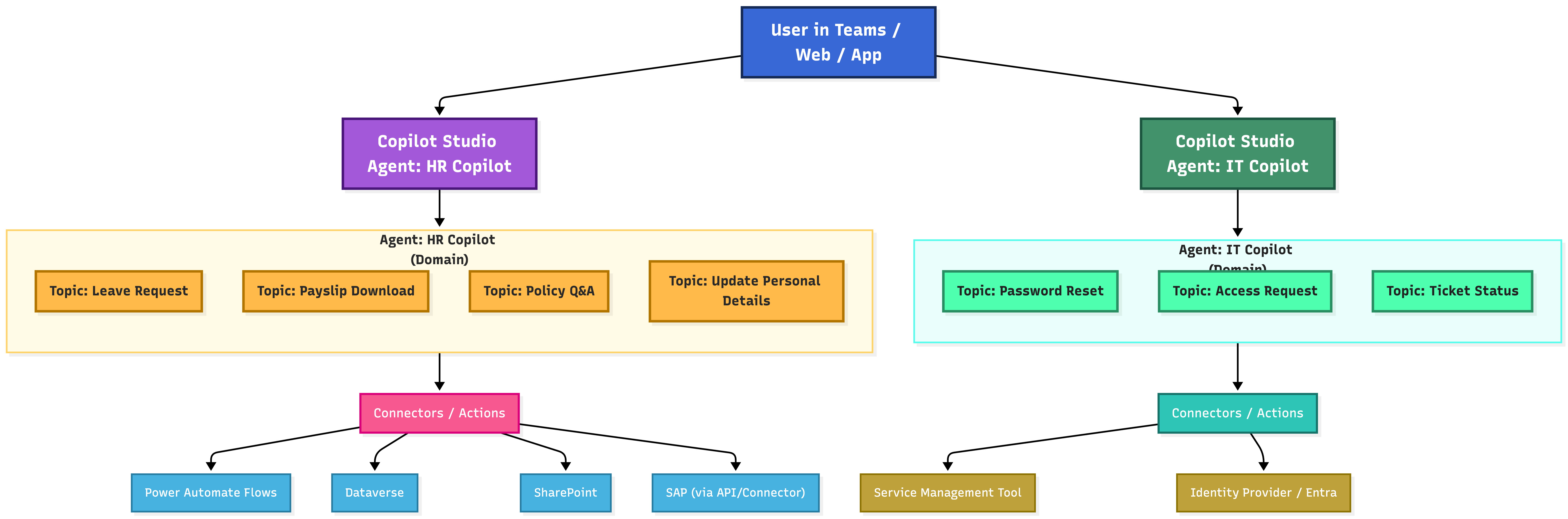
Inside an HR Copilot, you may have topics like:
- Apply for Leave
- Download Payslip
- View Holiday Calendar
- Update Personal Details
Take the Apply for Leave topic:
- Ask leave type and dates
- Check leave balance
- Trigger a Power Automate flow
- Confirm submission
This entire experience fits neatly inside the HR Copilot.
It doesn’t need its own identity.
It doesn’t need separate governance.
It is simply a capability of the HR agent.
Agents: Domain-Level Copilots
Agents are meant for larger domains that represent a business function.
An agent is not just a container for topics.
It is a standalone copilot with its own purpose, ownership, and lifecycle.
Agents typically:
- Contain multiple topics
- Have their own connectors and credentials
- Are owned by a specific department
- Are governed, secured, and versioned independently
- Can be published separately (Teams, Web, Mobile, Embedded)
Use an agent when the domain itself is big enough to stand on its own.
Example
A Travel Copilot Agent may include topics such as:
- Search and Book Flights
- Hotel Reservations
- Travel Policy Validation
- Expense Claims
- Visa Documentation
This agent connects to systems like:
- SAP Concur
- Travel booking platforms
- Dataverse
- SharePoint
Travel is not a single workflow.
It is a business capability with many moving parts.
That makes it a strong candidate for a dedicated agent.
A Common Mistake: One Giant Agent
Many teams start by placing everything into one large copilot:
HR topics, IT topics, Finance topics, Travel topics — all together.
This works initially, but over time it leads to:
- Bloated topic lists
- Complex security rules
- Confusing ownership
- Harder testing and deployment
Separating domains into agents creates clear boundaries:
- HR Agent
- IT Agent
- Finance Agent
- Travel Agent
Inside each agent, topics handle the individual workflows.
This structure scales much better.
How to Decide: A Simple Checklist
Choose a Topic when:
- The functionality is small and focused
- It belongs to an existing domain
- No separate ownership is required
- It shares the same data sources and connectors
Examples:
Leave request, greeting, password reset, policy FAQ
Choose a Dedicated Agent when:
- The domain is large or strategic
- Multiple workflows exist
- A separate team owns it
- Different connectors or credentials are required
- It needs its own lifecycle
Examples:
HR Copilot, IT Copilot, Finance Copilot, Travel Copilot
A Simple Mental Model
Topics are like features.
Agents are like products.
A product contains many features.
You don’t create a new product for every feature.
You also don’t put every feature for every business area into one product.
Good copilot architecture is about finding this balance.
Architecture diagram
Architecture diagram for a Copilot agent
Conclusion
Topics and agents are not competing options.
They solve different layers of the same problem.
- Topics help you design clean, modular workflows
- Agents help you organize those workflows around business domains
When you use each at the right level, your Copilot Studio solutions become:
- Easier to understand
- Easier to govern
- Easier to scale
And most importantly, easier to evolve as your organization grows.
Comparison table (quick reference)
| Decision area | Topic (inside an agent) | Agent (separate copilot) |
|---|---|---|
| Best for | Small, contained workflow | Large domain with many workflows |
| Ownership | Same team as the agent | Separate team / department |
| Governance | Inherits the agent’s governance | Independent governance and lifecycle |
| Publishing | Not published separately | Can be published separately (Teams/Web/App) |
| Connectors | Usually shared with the agent | Often has its own connectors/credentials |
| Scale risk | Topic sprawl if overused | Better boundaries; cleaner scaling |
Subscribe via RSS
Comments